Appearance
Zephyr Scale (TM4J Cloud) for Jira Cloud migration
WARNING
MIGRATION AVAILABLE FOR ALLURE TESTOPS VERSION > 4.26.0
Zephyr Cloud supports two types of fields: system fields and custom fields.
Understanding the difference between them is important for a successful migration to TestOps.
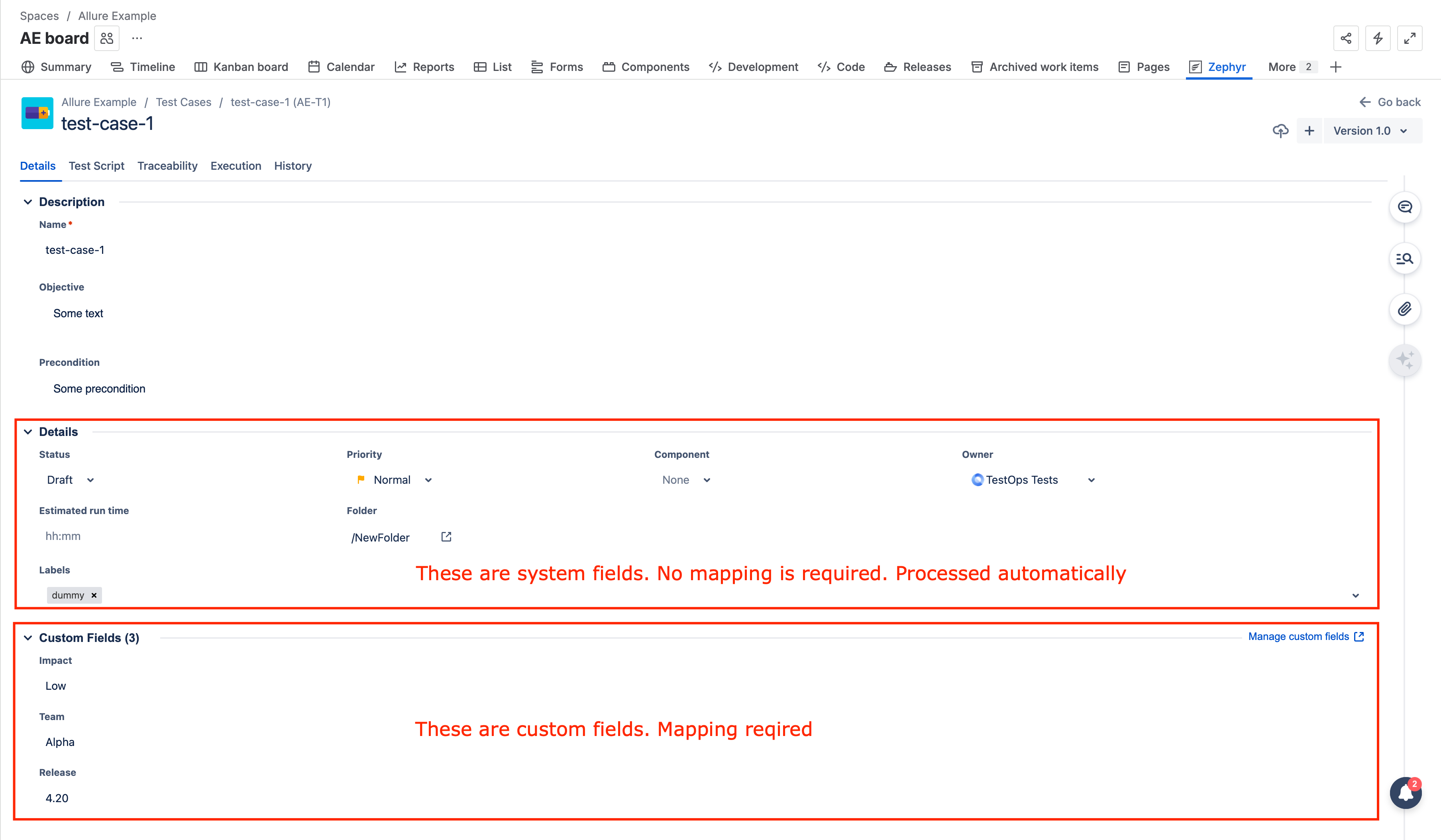
System Fields
System fields in Zephyr Cloud are processed automatically by the migration script.
- They do not require any additional configuration.
- They do not need to be mapped in the
config.jsonfile. - The migration script detects and transfers these fields by default.
If a field is system-defined, it should be migrated without any extra setup on your side.
Custom Fields
Custom fields must be explicitly mapped in the migration configuration.
- Custom fields are not processed automatically.
- Each custom field must be mapped in the
customFieldssection of yourconfig.json. - Without proper mapping, custom field values will not be migrated.
- The custom field on the TestOps side that you use for mapping must be added to the project before starting the migration.
Configuration file example
Create the json file with content like:
json
{
  "type": "tm4j-cloud",
  "debug": true,
  "oneByOne": true,
  "allureConfig": {
    "endpoint": "https://demo.testops.cloud/",
    "token": "1f4b4acd-418c-4d0b-8533-1d747abb7599",
    "sslTrustAll": true,
    "projectId": 6,
    "migrationTagPrefix": "tm4j",
    "folderCfPrefix": "Folder",
    "issueTrackerId": 6
  },
  "jiraConfig": {
    "endpoint": "https://comp.atlassian.net/",
    "username": "@comp.com",
    "password": "atlasian-api-key",
    "projectKey": "TI"
  },
  "tm4jCloudConfig": {
    "token": ".eyJzdWIiOiI1N2RhY2ZiMC1jOTYwLTMzNjYtOTU1OS05NmZjMzA4ZGQ3ZGUiLCJjb250ZXh0Ijp7ImJhc2VVcmwiOiJodHRwczpcL1wvdmJyYWdpbjAyLmF0bGFzc2lhbi5uZXQiLCJ1c2VyIjp7ImFjY291bnRJZCI6IjU1NzA1ODowMDcwMzcyZi04ZTc1LTRhNmMtOTM5NS1hYjc0MDU3ZmUxZjEifX0sImlzcyI6ImNvbS5rYW5vYWgudGVzdC1tYW5hZ2VyIiwiZXhwIjoxNjM1OTQ3MTYyLCJpYXQiOjE2MDQ0MTExNjJ9.Dad2w-un2tNf5G3xOmsLsSxLXT7lBdbPww8W8z-P7GY",
    "projectKey": "TI",
    "testscriptToDescription": true,
    "firstFolderAsSuite": true,
    "customFields": {
      "team": "Team",
    }
  }
}
Configuration parameters
| Name | Mandatory | Description | Example |
|---|---|---|---|
| commonProperties | yes | see description here: Common properties | |
| allureConfig | yes | see description here: Allure TestOps properties | |
| jiraConfig.endpoint | yes | Jira instance url | |
| jiraConfig.username | yes | Jira username | |
| jiraConfig.password | yes | Atlassian API key | |
| jiraConfig.projectKey | yes | Jira project key | TMJM |
| tm4jCloudConfig.token | yes | Zephyr Scale API token generated here: Zephyr Scale API Tokens | |
| tm4jCloudConfig.projectKey | yes | Jira project key | TMJM |
| tm4jCloudConfig.testscriptToDescription | no | If you need your TC scenario to migrate as the test description, set this flag to true. | false |
| tm4jCloudConfig.firstFolderAsSuite | no | If you need the first folder to migrate as the Suite custom field, set this flag to true. | false |
| tm4jCloudConfig.customFields | no | A list of Zephyr Custom fields which need to be migrated to Allure as custom fields. Structure: "jira_field_name": "TestOps_custom_field_name" | {"team": "Team"} |